Facebook Login Discontinued — Account Transfer Guide
Facebook login has been causing ongoing issues, inconveniencing our users. As a result, we have decided to discontinue Facebook login.
Don’t worry — your existing data can be safely transferred to another account. Please follow the steps below.
The Easiest Way: Log In with the Same Email
If you log in using another method with the same email as your Facebook account, your data will be linked automatically.
- Log in with Google, Apple, or Email sign-in.
- Email sign-in: Since you don’t have a password for first-time login, set a new password using ‘I forgot my password.’ on the ‘Sign in with Email’ screen before logging in.
If Your Data Isn’t Linked Automatically: Import in the App
After logging in with your new account, you can import your Facebook data directly in the app. Your existing data won’t be changed; only new data will be safely added.
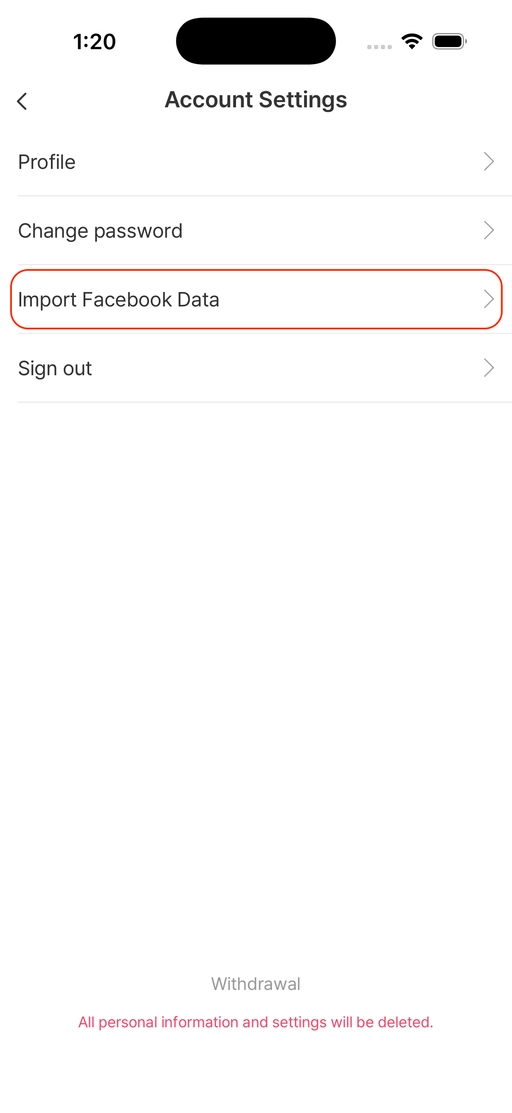
Step 1. Go to My Menu → Settings (⚙️) → Account Settings, then select ‘Import Facebook Data’.
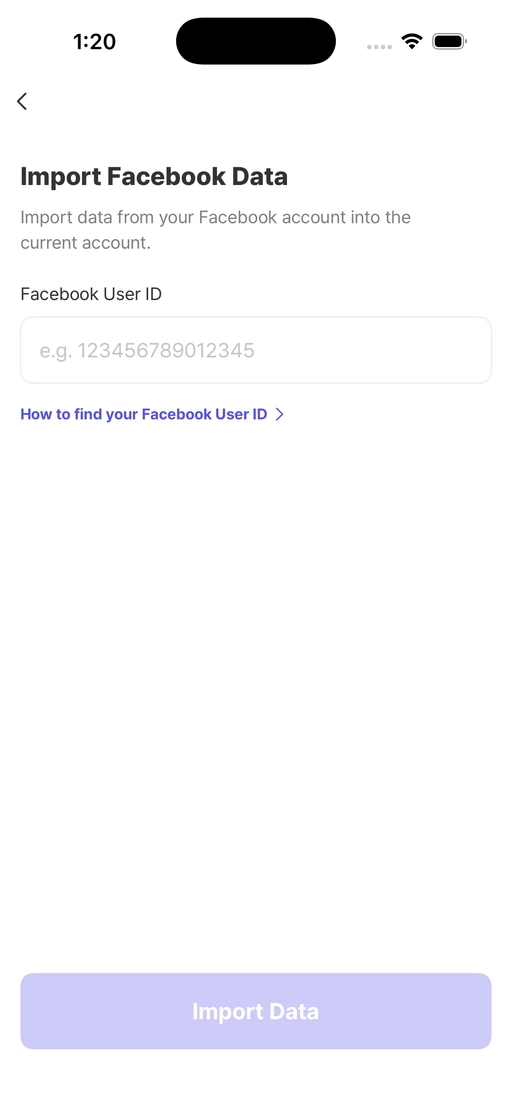
Step 2. Enter your Facebook User ID (a number) and tap the ‘Import Data’ button.
Step 3. Removing Your Old Facebook Account
Once you’ve finished importing your data, please reply to help@bomcomes.com with your Facebook User ID and the words ‘I agree to withdrawal.’
To protect your valuable personal information, we’ll securely delete your old Facebook login account on your behalf.
Frequently Asked Questions
- Q. Will my data be lost?
- No. Your existing data is kept safely and can be transferred to your new account.
- Q. Will my existing data be overwritten?
- No. Your existing data won’t be changed; only new data will be added.
- Q. I followed the steps but it’s still not working.
- Please contact us through My Menu → Settings → Help & Support → Bug report, and we’ll help you quickly.